Grid from text Examples
This document gives instructions for combining the graph drawing tool on https://csacademy.com/app/graph_editor/ with pgm-ds. Please note that the graph drawing tool is not linked to the power-grid-model project. This example solely illustrates how to use their editor to create a simple graph which can be loaded into power-grid-model-ds using a .txt file.
Creating input data for pgm-ds
Drawing a grid
The graph editor on https://csacademy.com/app/graph_editor/ is a very intuitive and easy to use tool for quickly drawing a grid.
A graph can be created by defining branches between nodes.
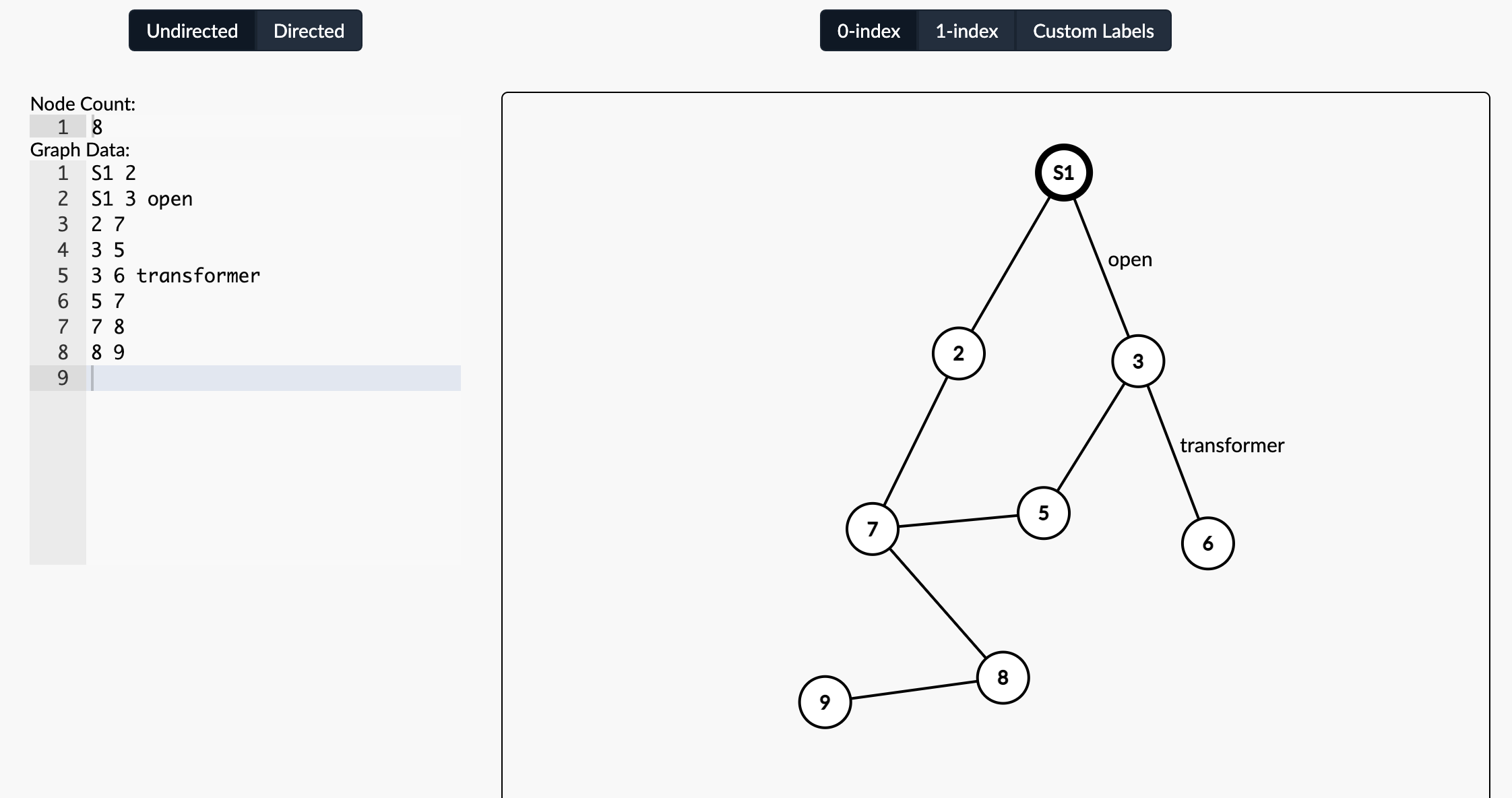
If you follow a specific syntax, you can use the input from the graph editor to transfer your drawing to pgm-ds:
A source node should be prefixed with
Se.g:
S1,S2
A line is defined as
<from_node> <to_node>From nodes can be both regular nodes and source nodes
e.g.:
S1 2,3 4
A transformer is defined as
<from_node> <to_node> transformere.g.:
8 9 transformer
A grid opening is defined by adding
opene.g.:
4 5 openfor lines or6 7 transformer,openfor transformers
Loading a drawn grid into pgm-ds
There are two ways of loading a text grid into a pgm-ds:
load grid from a .txt file
load grid from a list of strings
Load a grid from a .txt file
Copy the Graph Data of your grid to a text file (e.g. my_grid.txt).
For the example above, the file should contain the following data:
S1 2
S1 3 open
2 7
3 5
3 6 transformer
5 7
7 8
8 9
Then, using python’s pathlib module, navigate to your file and load your grid
from pathlib import Path

from power_grid_model_ds import Grid

txt_file_path = Path("../../_static/my_grid.txt")
grid = Grid.from_txt_file(txt_file_path)
Load grid from a list of strings
You can also load a grid directly from a list of strings
from power_grid_model_ds import Grid

grid = Grid.from_txt(
    [
        "S1 2",
        "S1 3 open",
        "2 7",
        "3 5",
        "3 6 transformer",
        "5 7",
        "7 8",
        "8 9",
    ]
)
---------------------------------------------------------------------------
AttributeError                            Traceback (most recent call last)
Cell In[2], line 3
      1 from power_grid_model_ds import Grid
----> 3 grid = Grid.from_txt(
      4     [
      5         "S1 2",
      6         "S1 3 open",
      7         "2 7",
      8         "3 5",
      9         "3 6 transformer",
     10         "5 7",
     11         "7 8",
     12         "8 9",
     13     ]
     14 )

File ~/checkouts/readthedocs.org/user_builds/power-grid-model-ds/checkouts/v1.1.2/src/power_grid_model_ds/_core/model/grids/base.py:424, in Grid.from_txt(cls, *args)
    411 @classmethod
    412 def from_txt(cls, *args: str):
    413     """Build a grid from a list of strings
    414
    415     See the documentation for the expected format of the txt_lines
   (...)
    422         alternative: Grid.from_txt("1 2\n2 3\n3 4 transformer\n4 5\nS1 6")
    423     """
--> 424     return TextSource(grid_class=cls).load_from_txt(*args)

File ~/checkouts/readthedocs.org/user_builds/power-grid-model-ds/checkouts/v1.1.2/src/power_grid_model_ds/_core/model/grids/_text_sources.py:40, in TextSource.load_from_txt(self, *args)
     37 def load_from_txt(self, *args: str) -> "Grid":
     38     """Load a grid from text"""
---> 40     text_lines = [line for arg in args for line in arg.strip().split("\n")]
     42     txt_nodes, txt_branches = self.read_txt(text_lines)
     43     self.add_nodes(txt_nodes)

File ~/checkouts/readthedocs.org/user_builds/power-grid-model-ds/checkouts/v1.1.2/src/power_grid_model_ds/_core/model/grids/_text_sources.py:40, in <listcomp>(.0)
     37 def load_from_txt(self, *args: str) -> "Grid":
     38     """Load a grid from text"""
---> 40     text_lines = [line for arg in args for line in arg.strip().split("\n")]
     42     txt_nodes, txt_branches = self.read_txt(text_lines)
     43     self.add_nodes(txt_nodes)

AttributeError: 'list' object has no attribute 'strip'
print(grid)
3 6 14,transformer
S1 2 10
S1 3 11,open
2 7 12
3 5 13
5 7 15
7 8 16
8 9 17